Using User Variables (MVARs) in Maestro
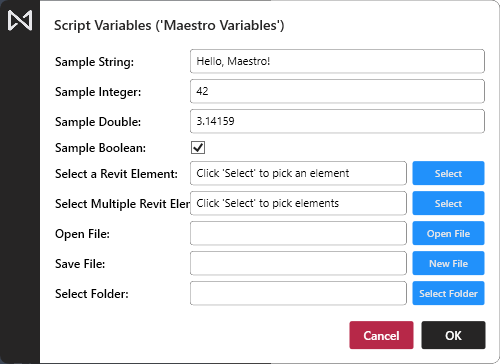
Maestro supports user-prompted variables using a feature called MVARs (short for Maestro Variables). This allows you to design scripts that prompt the user for input at runtime, making your tools more interactive and flexible.
What Are MVARs?
An MVAR is a top-level variable (outside any function or class) that is marked with a special inline comment to indicate that it should prompt the user for a value.
When you create a new top-level variable in the Maestro script editor, it will be highlighted grey—this visually indicates that it is eligible to be converted into an MVAR.
You can right-click on any of these grey variables to automatically convert them to MVARs using the correct syntax.
These variables are parsed by the Maestro CPython interpreter and replaced with user input before the script runs. Maestro’s AI Code Generator (v2 and all future versions) fully supports MVARs, allowing generated scripts to include user prompts where appropriate.
How to Define an MVAR
Use the following magic comment syntax on the same line as the variable:
my_var = <default_value> # @mvar(type='<type>', display='<Optional Display Name>')
MVAR Rules
- MVARs must be declared at the top level — not inside functions or classes.
- The magic comment must be on the same line as the variable assignment.
- The assigned value acts as a default, which may be overridden by user input.
- You must specify the
typeof the MVAR. Accepted types are:'string''int''double''bool''element''elements''file''folder'
- You may optionally add a
displayname to customize the prompt label. - To remove an MVAR, simply delete the
# @mvar(...)comment from the variable line:
my_int = 4 # @mvar(type='int', display='Count')
This will prompt the user with “Count” instead of “my_int”.
Example MVARs
string_var = "Hello, World"  # @mvar(type='string')
int_var = 2  # @mvar(type='int')
double_var = 2.2  # @mvar(type='double')
bool_var = False  # @mvar(type='bool')
element_var = None  # @mvar(type='element')
elements_var = None  # @mvar(type='elements')
open_file_var = "C:\Users\<UserName>\Desktop\example.txt"  # @mvar(type='file', mode='open')
save_file_var = ""  # @mvar(type='file', mode='save')
folder_var = "C:\Users\<UserName>\Desktop"  # @mvar(type='folder')
Special Cases
element and elements
- Must always be assigned
None - These represent Revit elements and must be selected by the user
file
- Requires a second argument:
mode='open'ormode='save' - Determines the type of file dialog shown to the user
Conditional Example
Here’s how you might use MVARs in a real-world script:
if not element_var:
    print("No Element was selected")
else:
    if bool_var:
        TaskDialog.Show("Dialog", str(element_var.Id))
    else:
        print(string_var)
 Summary Table
| Type | Description | Default Required? |
|---|---|---|
string |
Text input |  |
int |
Integer input | |
double |
Decimal input | |
bool |
True/False checkbox | |
element |
Single Revit element selection | Must be None |
elements |
Multiple Revit elements selection | Must be None |
file |
File path via dialog (open or save) |
|
folder |
Folder path via dialog | |
Use MVARs to prompt users and make your scripts reusable, dynamic, and interactive without complex UI code.
Sample Scripts
Align Objects
import clr
from System.Collections.Generic import List
import Autodesk

# Maestro Variables for user input
reference_element = None  # @mvar(type='element', display='Reference Element')
elements_to_align = None  # @mvar(type='elements', display='Elements to Align')
align_horizontally = True  # @mvar(type='bool', display='Align Horizontally (X-axis)')

def get_bounding_box_center(element):
    """
    Returns the center point of the element's bounding box in model coordinates.
    Returns None if the bounding box is not available.
    """
    bbox = element.get_BoundingBox(None)
    if bbox is None:
        return None
    min_pt = bbox.Min
    max_pt = bbox.Max
    center = Autodesk.Revit.DB.XYZ(
        (min_pt.X + max_pt.X) / 2.0,
        (min_pt.Y + max_pt.Y) / 2.0,
        (min_pt.Z + max_pt.Z) / 2.0
    )
    return center

def move_element_to_axis(element, axis_value, axis='X'):
    """
    Moves the element so that its bounding box center aligns with the given axis value.
    axis: 'X' or 'Y'
    Returns (True, None) if successful, (False, error_message) if failed.
    """
    center = get_bounding_box_center(element)
    if center is None:
        return False, "No bounding box"
    if axis == 'X':
        target = Autodesk.Revit.DB.XYZ(axis_value, center.Y, center.Z)
    else:
        target = Autodesk.Revit.DB.XYZ(center.X, axis_value, center.Z)
    translation = target - center
    # Only move if translation is not zero
    if translation.IsZeroLength():
        return True, None
    try:
        Autodesk.Revit.DB.ElementTransformUtils.MoveElement(doc, element.Id, translation)
        return True, None
    except Exception as e:
        return False, str(e)

def main():
    # Check reference element
    if not reference_element:
        print("ERROR: No reference element selected. Operation cancelled.")
        return

    ref_center = get_bounding_box_center(reference_element)
    if ref_center is None:
        print("ERROR: Reference element (Id: {}) does not have a bounding box. Cannot perform alignment.".format(reference_element.Id))
        return

    # Determine axis and value
    axis = 'X' if align_horizontally else 'Y'
    axis_value = ref_center.X if align_horizontally else ref_center.Y

    # Prepare list of elements to align
    if not elements_to_align or len(elements_to_align) == 0:
        print("ERROR: No elements selected to align. Please select at least one element.")
        return

    # Remove reference element from alignment list if present
    align_ids = [el.Id for el in elements_to_align]
    elements_to_process = list(elements_to_align)  # Make a copy to work with
    if reference_element.Id in align_ids:
        print("INFO: Reference element (Id: {}) was included in the selection to align. It will be skipped.".format(reference_element.Id))
        elements_to_process = [el for el in elements_to_align if el.Id != reference_element.Id]

    if not elements_to_process:
        print("ERROR: No elements left to align after removing the reference element from the selection.")
        return

    skipped = []
    aligned = []
    failed = []

    t = Autodesk.Revit.DB.Transaction(doc, "Align Elements to Reference")
    try:
        t.Start()
        for el in elements_to_process:
            center = get_bounding_box_center(el)
            if center is None:
                skipped.append((el, "No bounding box"))
                continue
            moved, error = move_element_to_axis(el, axis_value, axis)
            if moved:
                aligned.append(el)
            else:
                if error == "No bounding box":
                    skipped.append((el, error))
                else:
                    failed.append((el, error))
        t.Commit()
    except Exception as e:
        t.RollBack()
        print("ERROR: Transaction failed: {}".format(e))
        raise

    # Report results
    print("=== Alignment Results ===")
    print("Reference element: Id {} (aligned along {}-axis at value {:.3f})".format(reference_element.Id, axis, axis_value))
    print("Total elements selected to align: {}".format(len(elements_to_align)))
    print("Aligned elements: {}".format(len(aligned)))
    if aligned:
        print("Aligned element Ids: {}".format(", ".join(str(el.Id) for el in aligned)))
    if skipped:
        print("Skipped elements (not aligned):")
        for el, reason in skipped:
            print("  - Id {}: {}".format(el.Id, reason))
    if failed:
        print("Failed to move elements:")
        for el, error in failed:
            print("  - Id {}: {}".format(el.Id, error))
    if not aligned:
        print("WARNING: No elements were aligned. Please check your selection and try again.")


try:
    main()
except Exception as e:
    print("FATAL ERROR: Script failed: {}".format(e))
    raise
All Variables Showcase
import clr
import System

# String variable
string_var = "Hello, Maestro!"  # @mvar(type='string', display='Sample String')

# Integer variable
int_var = 42  # @mvar(type='int', display='Sample Integer')

# Double (floating point) variable
double_var = 3.14159  # @mvar(type='double', display='Sample Double')

# Boolean variable
bool_var = True  # @mvar(type='bool', display='Sample Boolean')

# Single Revit element selection
element_var = None  # @mvar(type='element', display='Select a Revit Element')

# Multiple Revit elements selection
elements_var = None  # @mvar(type='elements', display='Select Multiple Revit Elements')

# File selection (open dialog)
open_file_var = ""  # @mvar(type='file', mode='open', display='Open File')

# File selection (save dialog)
save_file_var = ""  # @mvar(type='file', mode='save', display='Save File')

# Folder selection
folder_var = ""  # @mvar(type='folder', display='Select Folder')

def print_mvar_values():
    print("String Variable:", string_var)
    print("Integer Variable:", int_var)
    print("Double Variable:", double_var)
    print("Boolean Variable:", bool_var)
    print("Element Variable:", element_var)
    print("Elements Variable:", elements_var)
    print("Open File Variable:", open_file_var)
    print("Save File Variable:", save_file_var)
    print("Folder Variable:", folder_var)

print_mvar_values()