Project/Workflow Name:
Bulk Modifying Project Templates for Specific Permitting Jurisdictions
Objective:
To streamline the process of preparing project templates for specific permitting jurisdictions by programmatically deleting views, renaming sheets, and updating schedules according to jurisdiction requirements.
Tools & Features Used:
- Maestro Tools: Script generation automation for family type creation and parameter updates
Workflow Overview:
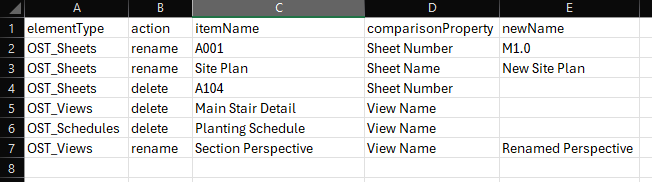
- CSV Preparation: Prepared a CSV file containing the necessary changes for views, sheets, and schedules.
- Script Setup: Used Maestro’s Script Generator to automate the deletion of views matching the jurisdiction’s criteria.
- Script Update: Programmatically updated sheet names to align with the required naming conventions.
- Error Management: Leveraged AI for handling errors and resolving issues automatically during the process.
- Future Use: Saved the CSV file as a reusable template for future projects, minimizing repetitive manual adjustments.
Prompt:
I have a CSV located on my desktop called “File Prep Legend.csv”. Set the path as a global parameter. The first row has headers and I would like to create a dictionary using the data. The dictionary key would be the itemName. Once the dictionary has been created I would like to follow these steps:
- Using the elementType, match the internal Revit element category and gather all elements that match the category.
- Use the comparisonProperty to determine which element property to compare the itemName to for a match.
- If the action is delete then delete the element, otherwise continue.
- If the action is rename then replace the current comparisonProperty with the newName.
Generated Code:
import csv
import clr
from Autodesk.Revit.DB import *

#Global Parameter for file path
import os

# Global Parameter for file path
CSV_PATH = os.path.join(os.environ['USERPROFILE'], 'Desktop', 'File Prep Legend.csv')

# Function to read CSV and create a dictionary
def create_dictionary_from_csv(csv_path):
    data_dict = {}
    with open(csv_path, 'r', encoding='utf-8-sig') as csvfile:  # Use utf-8-sig to handle BOM
        reader = csv.DictReader(csvfile)
        print(f"CSV Headers: {reader.fieldnames}")  # Debugging: Print CSV headers
        for row in reader:
            try:
                item_name = row['itemName']
                data_dict[item_name] = {
                    'elementType': row.get('elementType', '').strip(),
                    'comparisonProperty': row.get('comparisonProperty', '').strip(),
                    'action': row.get('action', '').strip(),
                    'newName': row.get('newName', '').strip()
                }
            except KeyError as e:
                print(f"Missing key in CSV row: {e}. Row data: {row}")
    return data_dict

# Function to get BuiltInCategory from string
def get_built_in_category(category_name):
    try:
        return getattr(BuiltInCategory, category_name)
    except AttributeError:
        print(f"BuiltInCategory {category_name} not found.")
        return None

# Function to process elements in Revit
def process_elements_in_revit(data_dict, doc):
    for item_name, item_data in data_dict.items():
        element_type = item_data['elementType']
        comparison_property = item_data['comparisonProperty']
        action = item_data['action']
        new_name = item_data.get('newName')

        if not element_type or not comparison_property or not action:
            print(f"Skipping item {item_name} due to missing data.")
            continue

        # Match internal Revit BuiltInCategory
        built_in_category = get_built_in_category(element_type)
        if not built_in_category:
            continue

        # Gather all elements in the category
        collector = FilteredElementCollector(doc).OfCategory(built_in_category).WhereElementIsNotElementType()
        elements_to_process = list(collector)  # Convert to list to prevent iterator issues

        for element in elements_to_process:
            try:
                # Compare the property value to itemName
                param = element.LookupParameter(comparison_property)
                if param and param.AsString() == item_name:
                    if action == "delete":
                        doc.Delete(element.Id)
                    elif action == "rename" and new_name:
                        param.Set(new_name)
            except Exception as inner_exception:
                print(f"Error processing element {element.Id}: {inner_exception}")


data = create_dictionary_from_csv(CSV_PATH)
doc = __revit__.ActiveUIDocument.Document  # Access the active Revit document
t = Transaction(doc, "Process Project")
t.Start()
try:
    process_elements_in_revit(data, doc)
except Exception as e:
    print(f"An error occurred: {e}")
finally:
    t.Commit()
Results:
The project template was successfully modified to meet the permitting requirements, with the following categories affected: Views, Sheets, and Schedules. By reusing the CSV, future projects can now be prepared quickly and consistently.
Visuals
Challenges & Insights:
- Challenges: Ensuring CSV data matched Revit’s parameters precisely for seamless updating.
- Insights: Automating the process with a reusable CSV dramatically reduces the time and effort required for these modifications.