Project/Workflow Name:
Automated Bulk Family Type Creation and Parameter Update
Objective:
Streamline the process of adding multiple family types to an existing Revit family and update parameters based on data in a CSV file. This reduces manual entry, enhances accuracy, and saves time on repetitive tasks, allowing the team to focus on impactful design adjustments.
Tools & Features Used:
- Maestro AI: Scripted automation for family type creation and parameter updates
Workflow Overview:
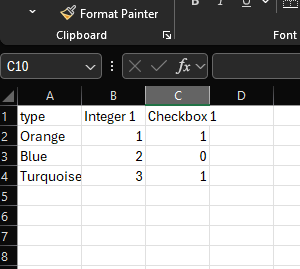
- CSV Preparation: Compile family types and associated parameters into a structured CSV.
- Script Setup: Use Maestro AI to automate reading from the CSV and create family types.
- Parameter Update: Automate parameter matching and updating for existing types to sync with the CSV.
- Error Management: AI-based handling to identify and resolve mismatches or missing data in the CSV without manual intervention.
Prompt:
I would like to create a script that will allow me to batch add multiple family types to the current family. It should look for a CSV on the desktop name “revit_type_batch.csv”. The first row will be the headers and column A will be the type. If there are additional columns, try and match them to the parameters in the project and if there is a match update the parameter value with the value of the cell matched with the type. This should be written for python3
Generated Code:
import csv
import os
from Autodesk.Revit.DB import Transaction, FilteredElementCollector, FamilySymbol, StorageType, ElementId, FamilyParameter

# Specify the path to the CSV file on the desktop
desktop_path = os.path.join(os.path.expanduser('~'), 'Desktop')
csv_file_path = os.path.join(desktop_path, 'revit_type_batch.csv')

# Read data from the CSV file
types_data = []
try:
    with open(csv_file_path, mode='r') as csv_file:
        csv_reader = csv.DictReader(csv_file)
        for row in csv_reader:
            if 'type' not in row:
                print("Error: 'type' column missing in CSV header. Please include a 'type' column.")
                raise KeyError("'type' column missing in CSV")
            types_data.append(row)
except Exception as e:
    print(f"Failed to read CSV file: {str(e)}")
    raise

# Process each row in the CSV file to create or update types and parameters
transaction = Transaction(doc, "Batch Add/Update Family Types")
transaction.Start()

try:
    for type_data in types_data:
        type_name = type_data.pop('type', None)
        if type_name:
            family_type = None
            # Try to find an existing type with the given name
            for elem in FilteredElementCollector(doc).OfClass(FamilySymbol):
                if elem.Name == type_name:
                    family_type = elem
                    break

            if not family_type:
                # If no matching type is found, create a new one
                family_type = doc.FamilyManager.NewType(type_name)

            # Activate the family type to modify parameters
            doc.FamilyManager.CurrentType = family_type

            # Update or set the parameters
            for param_name, param_value in type_data.items():
                try:
                    parameter = None
                    for param in doc.FamilyManager.Parameters:
                        if param.Definition.Name == param_name:
                            parameter = param
                            break

                    if parameter:
                        if parameter.StorageType == StorageType.Integer:
                            doc.FamilyManager.Set(parameter, int(param_value))
                        elif parameter.StorageType == StorageType.Double:
                            # Convert the string to a double. Unit conversion may be necessary depending on the parameter's unit type.
                            doc.FamilyManager.Set(parameter, float(param_value))
                        elif parameter.StorageType == StorageType.String:
                            doc.FamilyManager.Set(parameter, param_value)
                        elif parameter.StorageType == StorageType.Integer and parameter.Definition.ParameterType == ParameterType.YesNo:
                            doc.FamilyManager.Set(parameter, bool(int(param_value)))
                except Exception as e:
                    print(f"Error setting parameter '{param_name}': {e}")

except Exception as e:
    print(f"Error processing CSV data: {e}")
    transaction.RollBack()
else:
    transaction.Commit()
Results:
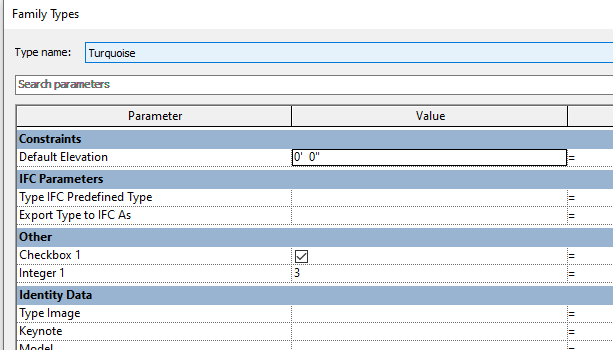
- Increased Accuracy: Automated updates minimized manual entry errors.
- Scalability: The process can be replicated across projects with diverse family parameters.
- Flexibility: Unlike a type catalog that requires a user to define the type of parameter the code generated handles matching the name and type. This allows for a more flexible usage.
- Visuals:
Challenges & Insights:
- Challenge: Ensuring CSV data matched Revit’s parameters precisely for seamless updating.
- Insight: AI error handling significantly reduced the need for troubleshooting, highlighting the potential of AI integration in design technology workflows.