The Maestro AI Panel provides an integrated workflow for generating and refining Revit Python scripts. Unlike traditional chat-style assistants, Maestro AI is engineered to be task-focused, non-conversational, and deeply integrated with the Maestro script editor.
Its sole purpose is to produce complete, correct, and maintainable Python scripts for Revit—and to make corrections when errors occur.
4.3.1 Overview
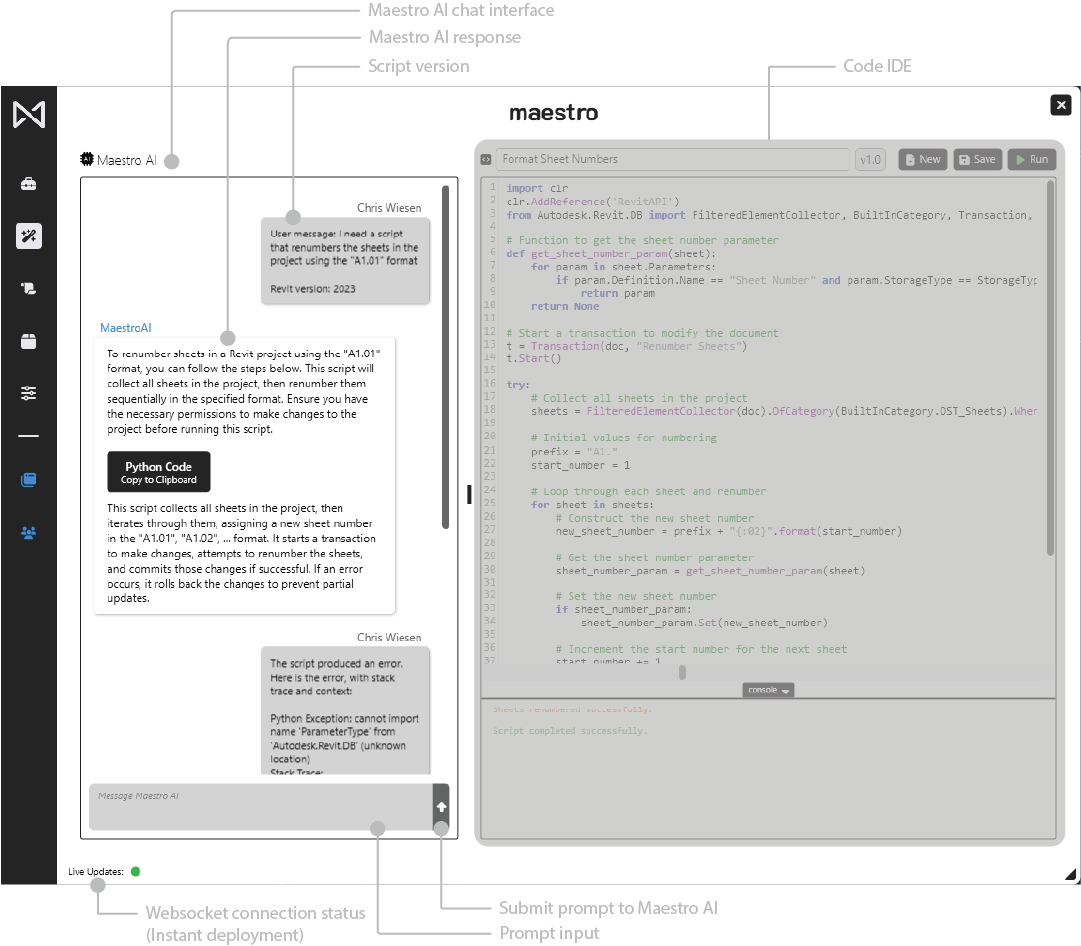
Maestro AI acts as a development partner inside Maestro.
Users describe what they want, and the AI produces an entire script automatically placed into the IDE.
Core behaviors:
- Users describe the automation they need
- Maestro AI generates a full script
- Maestro injects the generated script directly into the IDE
- Running the script triggers an auto-correction loop if errors occur
This enables rapid iteration without manual transfers or debugging overhead.
4.3.2 How Maestro AI Works
1. User Describes the Task
The user provides a direct description of the workflow or tool they want:
- Business logic
- Revit operations
- Expected inputs
- Example outputs
2. Maestro AI Generates Complete Code
Each response includes:
- A short explanation of the logic
- The reasoning behind the chosen API approach
- The Revit API elements involved
- A fully commented script
3. Code Is Automatically Written Into the IDE
No copy/paste is required.
The script replaces the current content unless the user has opened a new script.
4. Automatic Error-Correction Loop
If the script fails when executed:
-
Maestro captures:
- The full exception
- The stack trace
- Contextual details
-
Maestro feeds this directly back into the AI
-
Maestro AI produces a corrected version of the script
-
Maestro automatically updates the IDE with the revised script
-
The cycle repeats until the script runs successfully
4.3.3 Prompt Input
Users can input:
- Instructions
- Descriptions of workflows
- Error messages
- Snippets needing conversion
- Optimization requests
- Existing script fragments
Maestro AI is optimized for task-style prompting rather than natural conversation.
Example prompts:
- “Create a sheet renumbering tool using A1.01 formatting.”
- “Fix the null parameter assignment error in this script.”
- “Convert this Dynamo graph into a Python script.”