The Script Library panel is the central hub for managing all scripts available to the user. This includes both personal scripts and public scripts shared within the user’s organization. The interface allows users to browse, preview, execute, organize, and maintain their script ecosystem efficiently.
4.2.1 Overview
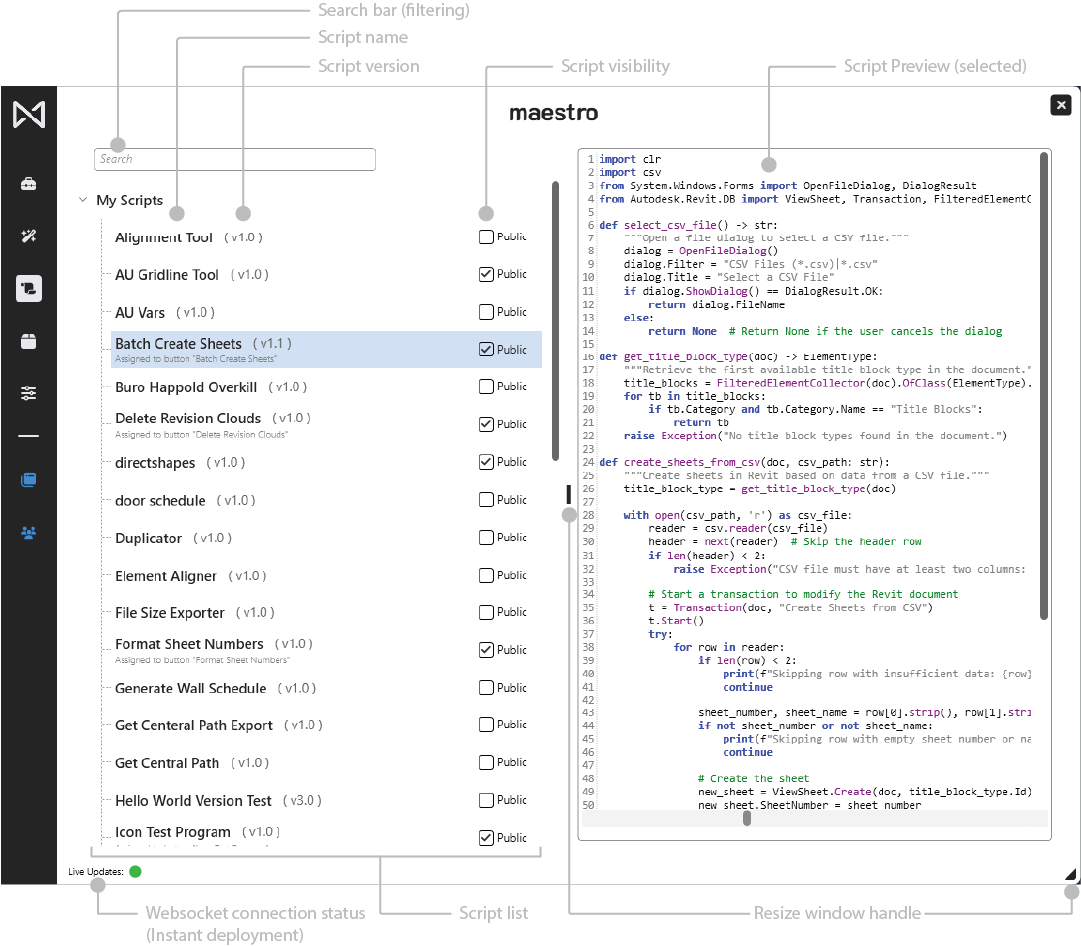
The Script Library organizes scripts into a list view with details such as version, visibility, and assignment state.
Selecting a script reveals a detailed preview and additional actions.
Key capabilities include:
- Viewing all accessible scripts
- Running scripts directly
- Assigning scripts to Ribbon buttons
- Publishing scripts as public within the organization
4.2.2 Script List
The left panel displays all scripts the user has access to.
Script Name
The display name of the script as it appears throughout Maestro.
Version (HEAD)
Indicates the currently active version of the script.
Assigned Button Indicator
Shows the name of the ribbon button assigned to the script, if any.
Visibility Toggle (Public)
Marks a script as public within the tenant.
- Public scripts are visible to all users in the user’s organization.
- Only the script owner may change visibility.
Modification Permissions
Only script owners may modify, rename, or publish new versions.
Multi-author support may be introduced later.
4.2.3 Search Bar
The search bar filters the script list in real time.
Useful when working with large libraries or firm-wide script catalogs.
4.2.4 Script Preview
Selecting a script loads its preview into the right-hand panel.
- The preview is read-only.
- It always reflects the HEAD version.
- Allows safe inspection before running or editing.
4.2.5 Context Menu (Right-Click)
Right-clicking a script in the list reveals actions:
Show in Script Editor
Opens the script in the IDE for editing (owners only).
Run Script
Executes the script immediately.
Rename Script
Renames the script (owners only).
Assign to Button
Creates or updates a ribbon button bound to the script.
Delete
Deletes the script only if it is not assigned to any button.
Scripts with active button assignments cannot be deleted.
The delete option will not appear in that case.